Classic Reporting vs. Performance Analytics vs. Platform Analytics vs. Platform Analytics Advanced
If you work with ServiceNow day-in and day-out, you’ve likely seen the analytics landscape shift. The terms we once used, like “Reporting” and “Performance Analytics,” have evolved. This can create confusion for teams trying to build a clear analytics roadmap.
Understanding the distinction between the standard and advanced tiers of Platform Analytics is key to helping your organization use its data effectively. Let’s walk through the modern structure together.
The 'why' behind the change
First, let’s address why this is happening. ServiceNow is officially retiring the Classic Reporting interface. The final deprecation is planned for the ServiceNow Australia release in 2026, making the move to the modern Platform Analytics Workspace a necessity for all users.
This isn’t just a change for the sake of change. ServiceNow is making this move to provide a more powerful and cohesive analytics experience. The key drivers behind this shift are:
Improved Performance: The new workspace is built on more modern architecture, offering faster, more intuitive dashboards.
Better User Experience: Platform Analytics is built directly into workspaces, creating a more connected and user-friendly environment.
Stronger Governance: The new framework provides better options for certifying and managing your dashboards and reports, leading to improved control and data accuracy.
Essentially, this evolution is about providing a more capable and reliable foundation for your organization’s data needs. Below, you find an overview of the key differences between the four reporting tools:
Feel free to use the information to guide your team when deciding which tool fits a specific need.
What is Platform Analytics (Standard)?
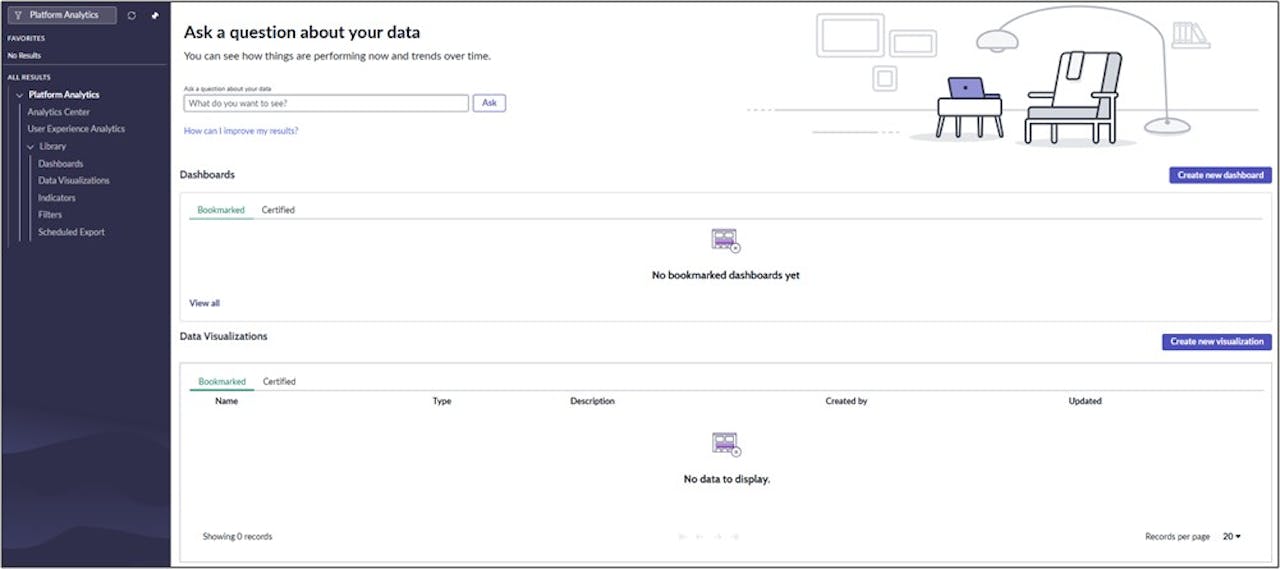
The Classic Reporting interface you’ve used for years is being succeeded by the Platform Analytics Workspace. This is the new standard for all ServiceNow users, and it’s included with your subscription. It’s your go-to tool for daily operational awareness, giving real-time insight and ad-hoc analysis. It’s designed to answer one critical question for your teams, who are often operational users like support agents: “What is happening right now?”.
This standard tier gives you a modern, responsive interface and powerful tools for analysis. A useful feature is Analytics Q&A, which allows any user to ask questions in plain language, like “Show me open incidents by category,” and get a visualization back instantly. This helps your business users get the answers they need without having to file a request with your development team, freeing you up for more strategic work.
How is "Advanced" different?
Platform Analytics Advanced is the premium tier that contains the capabilities formerly known as Performance Analytics. While the name has evolved, its purpose remains the same: to help you analyze trends and measure performance over time. This is the tool for strategic and leadership profiles within your organization. It answers the strategic question: “Did we improve, and where do we want to be?”.
The key difference is how it handles data. Instead of just showing live data, Platform Analytics Advanced uses scheduled, snapshot-based data collection. This historical data collection is what gives you the ability to:
Track your Key Performance Indicators (KPIs) against specific targets and thresholds you define for your business.
See clear trend lines to determine if your process improvements are having the intended effect.
Analyze performance forecasts to better anticipate future needs and resource allocation.
When a director asks if the new knowledge management process has reduced ticket resolution times over the last six months, this is the tool you’ll use to give them a confident, data-backed answer.
A unified platform for different needs
The goal of this new structure is not to replace one tool with another, but to provide a single, unified workspace where different types of analytics can coexist. Your teams can build dashboards that show both real-time operational data for front-line workers and historical KPI trends for managers.
This unified approach means less confusion for users and a more connected data story.
Business Outcome: When you guide your organization to use the right tool for the right job, you elevate the conversation. Your teams can move from simply reporting on what happened yesterday to having strategic discussions about how to improve performance tomorrow. This clarity helps everyone make better, more informed decisions, which is the entire point of collecting all this data in the first place.
Do you need help building your analytics strategy?
Navigating the new analytics framework can be a challenge. Contact us if your team wants help creating a clear analytics roadmap, establishing a sound governance model, or deciding which analytics tier best fits your business objectives.